From React + GraphQL to a Windows installer: packaging Financy with Electron
Daniel Garcia – 10 Mar. 2026

I’d never used Electron before, and the project didn’t have any desktop structure in place. What I had was the goal: turn the web app into a working offline desktop app with a Windows installer, so users don’t need to open the browser. If you’re thinking of doing something similar, this post might help: I’ll cover the project context, what I had to change on the front and back end, how it all fits together in development and in the installer, and finally the issues I ran into and how I fixed them.
I’m not an Electron expert and I’m not sure every choice I made was the best — my priority was a working app. If someone with more experience in the ecosystem has suggestions or alternatives, they’re always welcome (you can comment here or send me a message).
What project are we talking about?
Financy is a personal finance app: users set up categories (income and expenses), log transactions and see a summary by period in a dashboard. The existing stack was:
- Frontend: React with TypeScript, Vite, Apollo Client for GraphQL, React Router, Tailwind CSS.
- Backend: Node.js with TypeScript, Express, Apollo Server, TypeGraphQL, Prisma and SQLite.
So: a GraphQL API on port 4000 and a SPA that talks to it. The idea was to keep that base and add a “desktop window” that users install on Windows and use offline, without opening the browser or running anything in the terminal.
What changed on the frontend?
The frontend itself (screens, GraphQL, state) stayed the same. What changed was how the app loads and routes when it’s no longer served by a dev server (localhost:5173) and is opened from static files on disk.
Base path in Vite
Invite.config.tsI setbase: './'. So in the build, assets (JS, CSS, images) use relative paths. When Electron loadsindex.htmlviafile://, the browser can resolve those paths and the app loads instead of staying blank.Router: HashRouter on desktop, BrowserRouter in dev
Withfile://there’s no server to handle route fallbacks: a refresh on/dashboardwould break. So in the frontend’smain.tsxI used HashRouter whenwindow.location.protocol === 'file:'and BrowserRouter forhttp:(development). On desktop, routes look likefile:///.../index.html#/dashboard, and React Router keeps working.GraphQL API
Apollo Client still points tohttp://localhost:4000/graphql. In development the backend runs on 4000; in the installed app the backend starts inside Electron on the same port. For the frontend nothing changes: in both cases the API is at localhost:4000.
What changed on the backend?
The backend stayed the same GraphQL API (resolvers, Prisma, auth). The changes were so it can run in two ways: on its own in the terminal (as today) and inside the Electron process when it’s the installed app.
Export
startServer(options)
The logic that used to live only in abootstrap()became an exportedstartServer(options)that accepts options likeport,databaseUrl,corsOrigin,emitSchemaFile(and whatever else you need). Inside it, Express and Apollo Server are set up andapp.listen()returns thehttp.Serverso Electron can callserver.close()when the app closes.Call
startServer()only when it’s the entry point
To keep the “normal” backend usage working (e.g.npm run devwith tsx ornode dist/src/index.js),index.tsonly callsstartServer()when the file is run as the entry point. That’s detected viaprocess.argv[1]: if it ends withindex.jsorindex.tsit’s the main process and the server starts; otherwise (when the file is imported by Electron) it doesn’t start anything, it just exports the function.Relative imports with
.jsextension
The backend uses ESM ("type": "module"). In Node, relative imports need the extension. So every relative import (resolvers, services, graphql/context, etc.) I used.jsat the end (e.g.'./resolvers/health.resolver.js'). TypeScript still resolves types from.ts; the emitted code works with Node’s ESM resolution in the packaged app.Database in the installed app
On desktop,DATABASE_URLpoints to a SQLite file in Electron’s userData folder (e.g..../AppData/Roaming/Financy/financy.db) instead of a dev database. The backend doesn’t need to “know” if it’s dev or installer: it just receives the DB URL via options or env.
Day-to-day development
In dev I still use three terminals:
- Backend:
cd backend && npm run dev— runs the GraphQL API on port 4000 (and migrations if needed). - Frontend:
cd frontend && npm run dev— Vite on 5173 with hot reload. - Desktop:
cd desktop && npm run dev— builds the Electron main process and opens the window. The window loadshttp://localhost:5173, i.e. the same frontend as Vite. The frontend in the window talks to the backend on 4000. No static files orfile://in dev.
So you develop with the same experience as before: change frontend or backend and see the result in the Electron window without building the installer.
How I set up the installer
I built the installer flow on top of scripts and electron-builder config:
Backend build
A script (e.g.prepare-backend.js) runs the backend build (prisma generate,tsc), copiesdist,prismaandpackage.jsonto a folder (e.g.backend-packaged) and runsnpm install --omit=devthere. That folder is the “production backend” that goes into the installer.Frontend build
Vite builds the frontend (withbase: './'). The output is copied to a folder the Electron app uses (e.g.frontend-distinside the desktop project).electron-builder
The builder packages the desktop code (main process), the built frontend folder and, in extraResources, the backend folder (e.g.backend-packagedasbackendinresources). On Windows that becomes the NSIS installer the user runs.When the user opens the installed app
The Electron main process starts and, since it’s packaged:- Runs Prisma migrations (spawn Node with Prisma CLI,
cwdinresources/backend,DATABASE_URLpointing to SQLite in userData). - Dynamic-imports the backend entry (
resources/backend/dist/src/index.js) and callsstartServer({ port: 4000, databaseUrl, emitSchemaFile: false }). The server starts in the same process as Electron, no Node on PATH needed. - Creates the window and loads the frontend via
win.loadFile(indexHtml)— the staticindex.htmlthat was copied. The frontend loads withfile:protocol, uses HashRouter and still callshttp://localhost:4000/graphql. The backend is already listening.
- Runs Prisma migrations (spawn Node with Prisma CLI,
So in the installer everything works: one window, backend and frontend together, local DB on the user’s machine.
Problems I hit (and how I fixed them)
Along the way I ran into the issues below — and the fixes I used.
1. On Windows the backend never came up (ERR_CONNECTION_REFUSED)
What happened: In the installed app the UI opened but requests to http://localhost:4000/graphql failed with ERR_CONNECTION_REFUSED. The backend wasn’t running.
Why: The first idea was to start the backend as a separate process with spawn("node", [entryPath], ...). On Windows, when opening the app from the shortcut or executable, the Electron process didn’t inherit an environment with Node on PATH. The spawn couldn’t find node or failed, so the backend never started.
What I did: I stopped depending on Node on PATH. The backend is now loaded and started inside the main Electron process (dynamic import of the entry and call to startServer()). The server runs in the same process, no external node needed. Migrations still run via Prisma spawn (there you still need Node on PATH or another approach).
2. Port 4000 in use when reopening the app
What happened: After closing and reopening the app, I got “Backend didn’t start” or “port 4000 in use”. Sometimes it looked like a loop of start/kill attempts.
Why: With the backend in a separate process, when Electron closed the backend process wasn’t terminated properly. A “zombie” process kept holding port 4000; on the next launch the new backend couldn’t bind.
What I did: With the backend in-process, there’s no separate process to kill. On app shutdown (window-all-closed and before-quit) I call server.close() on the http.Server returned by startServer(), releasing the port. On the next open the port is free and the server starts again.
3. “Cannot find module” in the installed app (health.resolver, etc.)
What happened: After moving the backend in-process, opening the installed app showed Cannot find module for files like health.resolver (or other resolvers). The backend’s index.js loaded but internal imports (e.g. ./resolvers/health.resolver) weren’t found.
Why: With "type": "module", Node doesn’t add .js to imports. TypeScript compiles without changing paths, so the output still has from './resolvers/health.resolver'. Node looks for a file with that exact name (no extension) and doesn’t find it — the file is health.resolver.js.
What I did: I added the .js extension to all relative imports in the backend (and for folders with index, used context/index.js explicitly). TypeScript still resolves types from .ts; the emitted code works with Node’s ESM resolution in the packaged app.
4. npm run dev didn’t start the server
What happened: In development, running the backend with tsx watch src/index.ts, the server didn’t start and “Server started on port 4000!” never appeared.
Why: The condition for calling startServer() was something like process.argv[1]?.endsWith('index.js'). In the packaged app the entry is dist/src/index.js; in dev the command is tsx watch src/index.ts, so argv[1] ends with index.ts. The condition failed and the server never started in dev.
What I did: I treat both as entry: entry.endsWith('index.js') || entry.endsWith('index.ts'). So both the packaged build and npm run dev with tsx call startServer(). I also fixed the port fallback so it doesn’t use Number(process.env.PORT) ?? 4000 (which becomes NaN when PORT is undefined), using process.env.PORT ? Number(process.env.PORT) : 4000 instead.
Summary
| Problem | Cause | Solution |
|---|---|---|
| Backend doesn’t start on Windows (ERR_CONNECTION_REFUSED) | spawn("node", ...) without Node on PATH in installed app |
Backend in-process: dynamic import + startServer() |
| Port 4000 in use when reopening | Backend process wasn’t killed | No separate process; server.close() on quit |
| Cannot find module (health.resolver, etc.) | ESM in Node requires extension on relative imports | Add .js to all relative imports in the backend |
npm run dev doesn’t start server |
“Main” condition only checked for index.js |
Treat index.js or index.ts as entry |
In the end I got a working Windows installer: the user installs, opens the app, migrations run (when Node is on PATH for Prisma spawn), the backend starts inside Electron and the React UI talks to the GraphQL API on localhost:4000. The same stack (React + Vite + GraphQL + Apollo Server) still works in development with two terminals; on desktop it becomes a single executable with everything packaged — all without starting from a ready-made structure or prior Electron experience, just from wanting the web app as an offline desktop app.
To give an idea of the result, here are the metrics for the desktop version: runtime memory usage of the Electron processes, size of the generated executable and disk usage after installation.
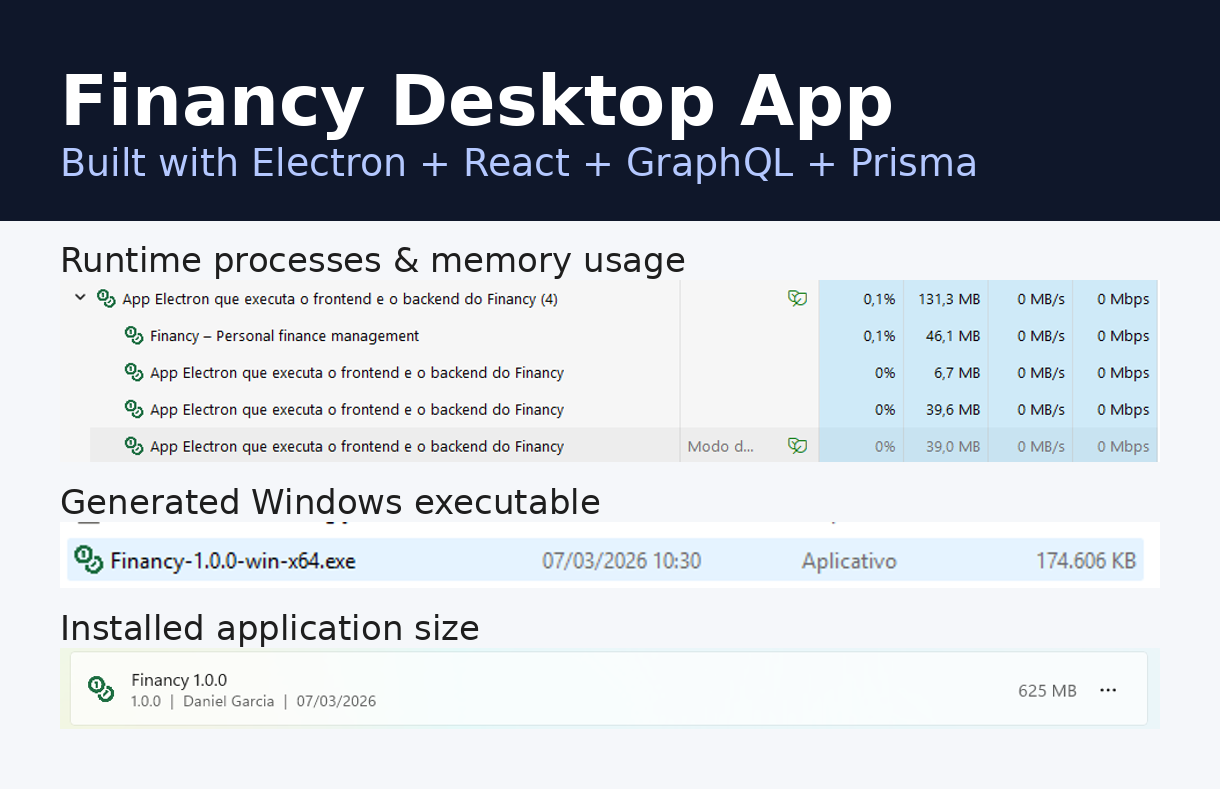
Runtime memory (~263 MB across Electron processes), Windows executable size (174.6 MB) and disk usage after installation (625 MB).
More?
- Want to see the merge request and the chaotic commit history? Pull Request — Desktop App.
- electron-builder docs.
- Node.js ESM and .js in imports.
- Want to chat? Drop me a message or find me on socials.